Your deadlines in your calendar.
Everyone subscribes to their own deadlines from “My tasks” – measures, reviews, approvals, training. The calendar fetches them itself, and Varmo only shows what the person can also see in Varmo.
- In all plans
- Only your own deadlines, read-only
- No content in the title (optional)
- My tasks
- your own deadlines
- Outlook
- Google Calendar
- Apple Calendar
- Due date
- Area, ID, activity
- Link
- Title of the item (default)
- Other people’s deadlines
AT A GLANCE
In Varmo, each person generates a personal subscription address under Calendar subscription; Outlook, Google Calendar or Apple Calendar then show their deadlines as all-day events with a link to Varmo.
Requirements
- Access: Access to Varmo (any role, including “Employees”)
- Calendar: A calendar that can subscribe via a web address: Outlook (web and desktop), Google Calendar, Apple Calendar and most others
Set up the subscription
Step 1: Generate the subscription address
In Varmo, click your initials at the top right and generate the subscription address.
Menu path: Your initials › “Calendar subscription” › “Generate subscription address”
Important:Copy the address and treat it like a password.
Details
- You can find it again at any time under “Calendar subscription” › “Show address”.
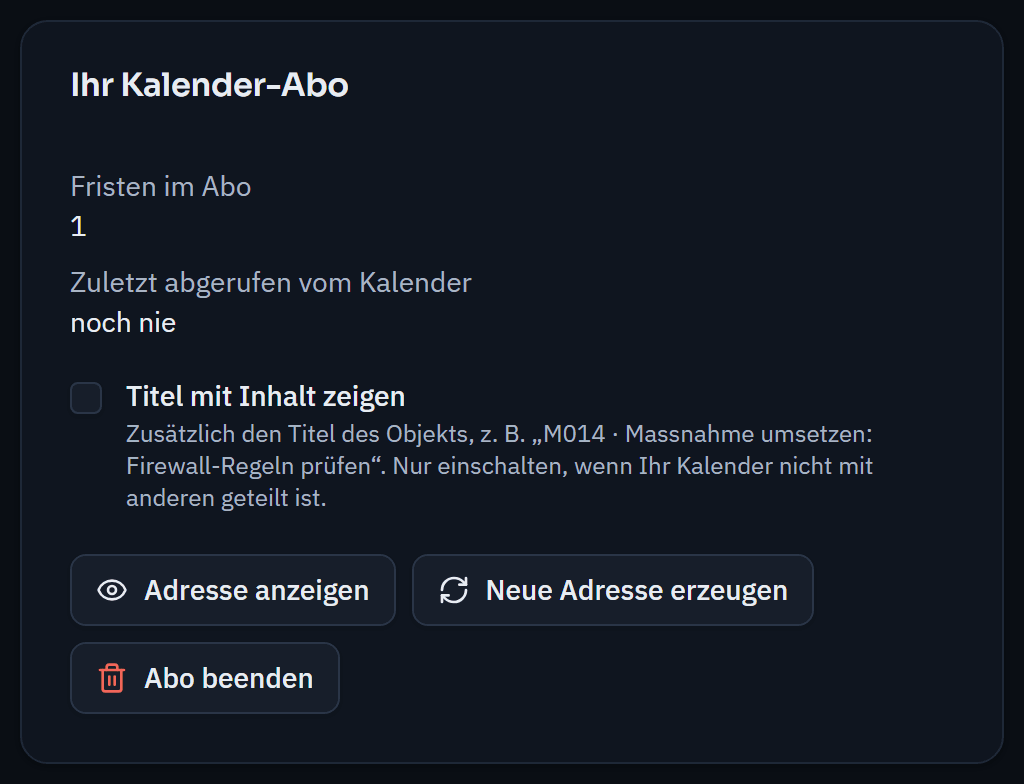
The subscription address stays hidden until you show it; titles with content only on request. Step 2: Subscribe in your calendar
Paste the address into your calendar app as a subscription from the web.
- Outlook
Menu path: Calendar › Add calendar › Subscribe from web › Paste the address
- Google Calendar
Menu path: Other calendars (+) › From URL › Paste the address
- Apple Calendar
Menu path: File › New Calendar Subscription › Paste the address
- Outlook
What appears in the calendar
Each deadline appears as an all-day event on its due date, with a link to Varmo. The title shows the area, ID and activity, e.g. “Measures: M014 · Implement measure”.
The calendar only shows the title of the item (e.g. of the measure) if you deliberately switch this on under “Calendar subscription” – these titles are then also stored by the calendar service.
When the events are updated
| When | What happens |
|---|---|
| You open Varmo | Varmo updates your deadlines. |
| Afterwards | Your calendar fetches them itself, depending on the service after a few minutes to a few hours (Google Calendar sometimes less often). |
| What counts | If a deadline changes, you see this in the calendar with a delay; “My tasks” remains the authoritative source. |
- When: You open VarmoWhat happens: Varmo updates your deadlines.
- When: AfterwardsWhat happens: Your calendar fetches them itself, depending on the service after a few minutes to a few hours (Google Calendar sometimes less often).
- When: What countsWhat happens: If a deadline changes, you see this in the calendar with a delay; “My tasks” remains the authoritative source.
Generate a new address or end the subscription
“Generate new address”
- The previous address stops working immediately (e.g. if it has been passed on)
“End subscription”
- The address stops working
- You also remove the calendar in your calendar app
If your access to Varmo is deactivated, the subscription no longer delivers anything either.
If something doesn’t work
The calendar stays empty
Open “My tasks” once; only tasks with a deadline appear in the calendar.
“The address is not (or no longer) valid”
A new address was generated, the subscription was ended or your access was deactivated – generate a new address.
A completed deadline is still in the calendar
The calendar has not fetched the feed again yet; this corrects itself on the next fetch.
Frequently asked questions
Which calendars support the calendar subscription?
Outlook (web and desktop), Google Calendar, Apple Calendar and most other calendars that can subscribe via a web address. The subscription is included in all plans.
Can other people see my deadlines?
No. Each person only subscribes to their own deadlines from “My tasks”, and Varmo only shows what the person can also see in Varmo. The title shows the area, ID and activity; the title of the item only if you deliberately switch this on.
How quickly do changes appear in the calendar?
Varmo updates your deadlines as soon as you open Varmo. Your calendar then fetches them itself, depending on the service after a few minutes to a few hours. “My tasks” remains the authoritative source.
How close are you to ISO/IEC 27001?
In a personal demo, we show you the way to the readiness report, with no obligation. Or try it free for 30 days with every feature.