 INTEGRATIONS · SERVICENOW · NEW
What runs in ServiceNow belongs in your ISMS.
Security-relevant changes and tasks become measures in Varmo, servers and applications from the CMDB become assets. Varmo only reads – nothing changes in ServiceNow.
- Included from the Pro plan
- Preview before the import
- Undo for each import
ServiceNow- Table API
- Encoded Query
- Measures
- Assets (proposal)
- Mapped fields
- People by email
- People without access
- nothing back to ServiceNow
AT A GLANCE
From Pro, Varmo imports records from any ServiceNow table via the Table API (e.g. change_request, sc_task, cmdb_ci_server), with a filter as an encoded query, people by email address, a preview, conflict detection and undo; credentials encrypted, no write-back to ServiceNow.
Requirements
- Plan: Varmo Pro or Ultimate
- In Varmo: “Manage integrations” and “Import data”, plus the right for the target
- ServiceNow: An instance at
https://<name>.service-now.com - ServiceNow: An account just for Varmo with read access to the tables you need
By default, the ISMS managers have these rights in Varmo.
Setup
Step 1: Create an account in ServiceNow
Create an account, e.g. “varmo.import”, tick “Web service access only” and set a strong password.
Menu path: User Administration › Users › New
Read only:itilfor changes and taskscmdb_readfor the CMDBsys_userfor peopleoptionallysys_dictionaryfor field labelsImportant:Do not assign an admin role: Varmo only needs read access.
Details
- To map people, the account needs read access to users (
sys_user); for field labels, optionally tosys_dictionary.
- To map people, the account needs read access to users (
Step 2: Enter credentials
Add the “ServiceNow” integration and enter the account’s details under “Enter credentials”.
Menu path: ISMS settings › Integrations › “Add integration” › ServiceNow
Input:Instance (https://<name>.service-now.comor just the name)User namePasswordResult: Varmo checks the connection immediately and shows “Connected as …”. The password is stored encrypted and never displayed again.
Step 3: Choose the table and filter
“Import data”, choose the target and enter the table; optionally a filter as an encoded query.
Example:
active=true^assignment_group.name=InformationssicherheitWhat becomes what
What becomes what Table in ServiceNow Target in Varmo change_request (changes) Measures sc_task (catalogue tasks) Measures Change and problem tasks Measures cmdb_ci_server (servers), computers, applications, databases Assets Other tables enter them by their technical name - Table in ServiceNow: change_request (changes)Target in Varmo: Measures
- Table in ServiceNow: sc_task (catalogue tasks)Target in Varmo: Measures
- Table in ServiceNow: Change and problem tasksTarget in Varmo: Measures
- Table in ServiceNow: cmdb_ci_server (servers), computers, applications, databasesTarget in Varmo: Assets
- Table in ServiceNow: Other tablesTarget in Varmo: enter them by their technical name
Details
- Filter: filter the list in ServiceNow, right-click the filter › “Copy query”.
- At most 10,000 records per import.
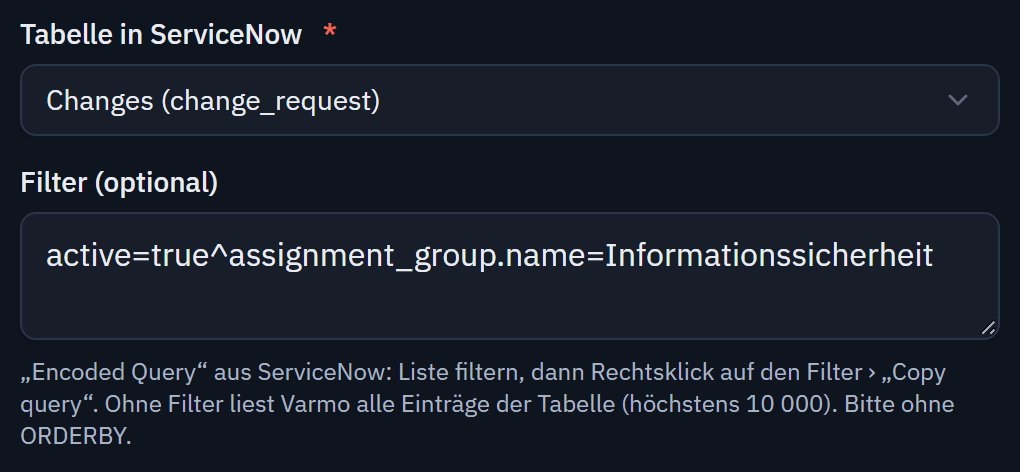
Table and filter as in ServiceNow; Varmo recognises every entry by its sys_id. Step 4: Map fields
Varmo reads the first 200 records and suggests mappings, e.g. Short description → title, Assigned to → responsible.
Details
- Instead of a field, you can also use a fixed value, such as one asset category for all servers.
- You map choice fields (status, priority) to the values in Varmo; Varmo recognises people by their email address.
- Varmo shows the sample values from the first 200 records only for the mapping and does not store them.
- For linked users, Varmo only reads the email address; Varmo does not store the names of people without access to Varmo.
Step 5: Check the preview and import
Check the preview and “Start import”.
Note:Later imports recognise records by their
sys_id; the number (e.g. CHG0030001) or the name is displayed.
How entries arrive
- Measures
- at most as “In progress”
- Assets
- as a proposal: in the inventory only once accepted (notice in the inventory and as a task)
No import ever grants an approval.
- Protected
- An import never changes what has already been reviewed, implemented or approved in Varmo.
- Conflict
- Changed in both systems: the version in Varmo applies until the ISMS manager decides.
- Undo
- Every import: new entries are deleted, updated ones are reset – unless they have been changed in Varmo since.
- Logged
- Everything runs with your permissions and the rules of Varmo, just as if done by hand, and appears in the change log.
Repeated imports and special cases
- Repeated imports recognise every entry by its reference: changed entries are updated, unchanged ones stay as they are.
- If an entry is missing from the next import, Varmo reports it as “no longer present” but deletes nothing.
If something doesn’t work
“Sign-in to ServiceNow failed”
Check the user name or password; is the account locked or has the password expired?
“The ServiceNow account may not read this table”
Give the account the itil or cmdb_read role.
“ServiceNow rejected the query: Invalid table …”
Check the table’s technical name; it appears in the address of the list, e.g. change_request_list.do.
“A developer instance is hibernating”
Free developer instances hibernate after a few hours without use; wake them up in the ServiceNow Developer Portal.
“More than 10,000 records”
Narrow down with a filter and import e.g. by group.
People remain empty
The email address in ServiceNow is missing or does not belong to a member – map it to a member in the wizard.
Switch off
In Varmo
- Remove the connection under ISMS settings › Integrations – the password is deleted
In ServiceNow
- Deactivate the account for Varmo
Imported entries remain.
Microsoft, Entra, Intune and Teams are trademarks of Microsoft Corporation; JIRA is a trademark of Atlassian; ServiceNow is a trademark of ServiceNow, Inc. Their mention does not imply a partnership.
Frequently asked questions
Which rights does the account need in ServiceNow?
Read access only: the itil role for changes and tasks, cmdb_read for the CMDB and read access to users (sys_user) to map people. An admin role is not required.
Which tables can Varmo import?
Any table via the Table API, such as changes (change_request) and catalogue tasks (sc_task) as measures, or servers (cmdb_ci_server) and applications as assets; at most 10,000 records per import.
Does Varmo change anything in ServiceNow?
No. Varmo only reads; nothing changes in ServiceNow. Assets from the CMDB only appear in the inventory after they have been accepted.
How close are you to ISO/IEC 27001?
In a personal demo, we show you the way to the readiness report, with no obligation. Or try it free for 30 days with every feature.