Build Varmo into your processes.
Your monitoring reports incidents, your ticketing system sets measures to “implemented”, your own reports read risks and requirements. For each key, you decide which areas it may read or edit.
- Included from the Pro plan
- OpenAPI 3.1
- Webhooks with signature, retries and log
- Monitoring
- Ticketing system
- Script
- Risks
- Measures
- Incidents
- Assets
- Exceptions
- Read and create
- Webhooks, signed
- Approve, submit
- Assess
- Permissions, settings
AT A GLANCE
From Pro, Varmo offers a REST API (JSON, OpenAPI 3.1) with API keys per technical API member and signed webhooks (HMAC-SHA256); reading and creating data is possible, approving, assessing and granting permissions is not.
Prerequisites
- Plan: Varmo Pro or Ultimate and the Tenant Admin role (only Tenant Admins manage keys and webhooks)
- Your system: A system that can send HTTPS requests with JSON, e.g. monitoring, a ticketing system or a script
- Webhooks: A receiver with an https address that is reachable from the internet (no internal or private addresses)
Setup
Step 1: Create an API key
Choose a name, a validity period (30 days to 1 year) and the access.
Menu path: Administration › API keys › “Create key”
Access per area
Access per area Area Access Assets, risks, measures, exceptions, incidents no access, read, or read and edit Other areas “read other areas”: policies, requirements, documents, audits, objectives, training, members - Area: Assets, risks, measures, exceptions, incidentsAccess: no access, read, or read and edit
- Area: Other areasAccess: “read other areas”: policies, requirements, documents, audits, objectives, training, members
Important:The key starts with
vk_and has 46 characters. Use “Copy key” and store it securely, e.g. in your password vault or as a secret in your system.Result: Varmo creates an API member for it, e.g. “API: Monitoring”.
Details
- Tenant Admins can find the key again later under “Show”; every time it is shown is recorded in the administration log.
- Change the access under “Edit access”; it applies from the next request.
- Before it expires, create a “New key” and replace it in your system; “Revoke” blocks the key immediately.
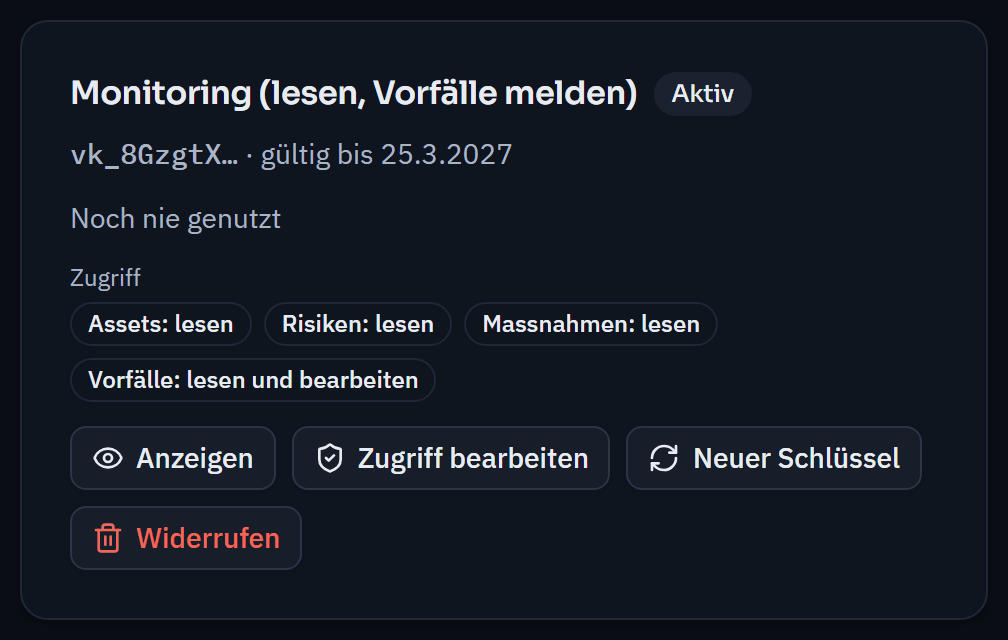
Every key has its own access per area and an expiry date; only the first characters are shown. Step 2: Send your first requests
All requests go to the base URL, with the key in the
Authorizationheader.Base URL https://varmo.ch/api/v1Who am I (organisation, API member, access) curl -H "Authorization: Bearer $VARMO_API_KEY" https://varmo.ch/api/v1/meMeasures changed since 1 October curl -H "Authorization: Bearer $VARMO_API_KEY" \ "https://varmo.ch/api/v1/measures?limit=100&updated_since=2026-10-01T00:00:00Z"Report an incident from monitoring curl -X POST "https://varmo.ch/api/v1/incidents" \ -H "Authorization: Bearer $VARMO_API_KEY" \ -H "Content-Type: application/json" \ -d '{"title":"Disk full on srv-backup","description":"Alert from monitoring","detected_at":"2026-10-19T08:15:00Z","personal_data":"no"}'Report a measure as implemented (e.g. when the ticket is closed) curl -X POST "https://varmo.ch/api/v1/measures/<id>/status" \ -H "Authorization: Bearer $VARMO_API_KEY" \ -H "Content-Type: application/json" \ -d '{"status":"implemented","comment":"Ticket SEC-12 closed"}'Details
- Responses are JSON; lists are paginated (
next_cursor) and can be limited to changes since a point in time withupdated_since.
- Responses are JSON; lists are paginated (
What an API member may do
May
- Exactly what is set under “Access” for the key – read, create and edit
- Functional roles do not apply to API members
Never
- Approve, submit, assess risks
- Grant functional roles or permissions, change members or settings, read the audit log
An API member never signs in, does not appear in any people picker and does not count as a user.
Every change appears in the change log with the API member as the acting person; new assets arrive as proposals and only appear in Varmo once accepted.
All endpoints
The full description with all fields is available as an OpenAPI file at https://varmo.ch/api/v1/openapi.json – you can load it into Postman, Insomnia or code generators.
- Read
- GET/me– organisation, API member, access
- GET/assets, /risks, /measures, /exceptions, /incidents– each also with /{id}
- GET/findings, /frameworks, /requirements, /members– each also with /{id}
- Risks
- POST/risks– report
- PATCH/risks/{id}
- POST/risks/{id}/comments
- Measures
- POST/measures
- PATCH/measures/{id}
- POST/measures/{id}/status, /comments, /links
- Exceptions
- POST/exceptions– draft
- PATCH/exceptions/{id}, /comments, /links
- Assets and incidents
- POST/assets– proposal
- PATCH/assets/{id}, /links
- POST/incidents
- PATCH/incidents/{id}
Errors and limits
- Errors are always JSON
{"error": {"code", "message"}}; the message states the reason – in German by default, in English with the headerAccept-Language: en - At most 120 requests per minute and key (then 429 with
Retry-After), payloads up to 64 KB - Versioning: changes that break existing integrations only appear under
/api/v2;/api/v1is only extended
Error codes
| Code | Meaning |
|---|---|
| 401 | key missing, invalid, expired or revoked |
| 403 | permission missing or plan without API |
| 404 | does not exist or is not visible |
| 400 | invalid input |
| 422 | rejected by the rules (e.g. a required field of your organisation) |
| 429 | too many requests |
- Code: 401Meaning: key missing, invalid, expired or revoked
- Code: 403Meaning: permission missing or plan without API
- Code: 404Meaning: does not exist or is not visible
- Code: 400Meaning: invalid input
- Code: 422Meaning: rejected by the rules (e.g. a required field of your organisation)
- Code: 429Meaning: too many requests
Frequent errors (401, 403, 404) from the same address may be treated as an attack by the platform’s protection, which can block the address temporarily – check your keys and IDs instead of retrying.
Set up webhooks
Webhooks tell your system immediately that something has happened in Varmo. The notification only contains the event, time, type and ID – your system fetches the content via the API with its key, so it only sees what the API member may see.
Step 1: Create a webhook
Choose a name, the https address of your receiver and the events.
Menu path: Administration › Webhooks › “Create webhook”
Important:Store the secret shown (it starts with
whsec_) at the receiver; it is only shown once.Details
- Only https, no internal or private addresses, no redirects.
Step 2: Send a test delivery
“Test delivery” sends an event of type
ping.Step 3: Respond to deliveries
Your receiver responds within 10 seconds with a 2xx status.
Details
- Otherwise Varmo retries several times over around 20 hours.
- After 20 failures in a row, the webhook is paused and Tenant Admins receive a task; saving ends the pause.
Events
| Event | Meaning |
|---|---|
| approval.requested | approval pending |
| incident.reported | incident reported |
| risk.reported | risk reported |
| measure.status_changed | status of a measure changed |
| task.overdue | tasks overdue (once a day) |
| role.vacant | functional role vacant |
- Event: approval.requestedMeaning: approval pending
- Event: incident.reportedMeaning: incident reported
- Event: risk.reportedMeaning: risk reported
- Event: measure.status_changedMeaning: status of a measure changed
- Event: task.overdueMeaning: tasks overdue (once a day)
- Event: role.vacantMeaning: functional role vacant
POST /varmo HTTP/1.1
Content-Type: application/json
Varmo-Event: incident.reported
Varmo-Delivery: 6f0d7c1e-…
Varmo-Signature: t=1792396500,v1=5b1c…

{"id":"9a7e…","type":"incident.reported","created_at":"2026-10-19T08:15:02Z",
 "organisation_id":"1e30…","api_version":"v1",
 "data":{"object_type":"incident","object_id":"4b07…","code":"V004",
         "url":"https://varmo.ch/isms/incidents/4b07…"}}
Verify the signature
Verify every delivery before you trust it.
- The signature is an HMAC-SHA256 with your secret over “<t>.<body>”, and t must be no more than 5 minutes old
- Verify the unchanged body, not a newly serialised JSON
- The same delivery may arrive more than once when retried; the id helps you detect duplicates
import { createHmac, timingSafeEqual } from "node:crypto";

// rawBody: der unveränderte Inhalt der Anfrage (Text), nicht neu serialisiert.
export function verifyVarmoSignature(secret, header, rawBody, toleranceSeconds = 300) {
  const parts = Object.fromEntries(
    String(header ?? "").split(",").map((p) => p.trim().split("=")),
  );
  const timestamp = Number(parts.t);
  if (!Number.isInteger(timestamp) ||
      Math.abs(Date.now() / 1000 - timestamp) > toleranceSeconds) {
    return false;
  }
  const expected = createHmac("sha256", secret)
    .update(`${timestamp}.${rawBody}`)
    .digest("hex");
  const given = String(parts.v1 ?? "");
  return given.length === expected.length &&
    timingSafeEqual(Buffer.from(given), Buffer.from(expected));
}import hashlib
import hmac
import time
def verify_varmo_signature(secret: str, header: str, raw_body: bytes, tolerance: int = 300) -> bool:
parts = dict(p.strip().split("=", 1) for p in (header or "").split(",") if "=" in p)
try:
timestamp = int(parts.get("t", ""))
except ValueError:
return False
if abs(time.time() - timestamp) > tolerance:
return False
expected = hmac.new(secret.encode(), f"{timestamp}.".encode() + raw_body, hashlib.sha256).hexdigest()
return hmac.compare_digest(expected, parts.get("v1", ""))function Test-VarmoSignature {
param([string]$Secret, [string]$Header, [string]$RawBody, [int]$Tolerance = 300)
$parts = @{}
foreach ($p in ($Header -split ',')) {
$kv = $p.Trim() -split '=', 2
if ($kv.Count -eq 2) { $parts[$kv[0]] = $kv[1] }
}
$t = 0L
if (-not [long]::TryParse([string]$parts['t'], [ref]$t)) { return $false }
$now = [DateTimeOffset]::UtcNow.ToUnixTimeSeconds()
if ([math]::Abs($now - $t) -gt $Tolerance) { return $false }
$hmac = New-Object System.Security.Cryptography.HMACSHA256 (,[Text.Encoding]::UTF8.GetBytes($Secret))
$hash = $hmac.ComputeHash([Text.Encoding]::UTF8.GetBytes("$t.$RawBody"))
$expected = -join ($hash | ForEach-Object { $_.ToString('x2') })
return $expected -ceq [string]$parts['v1']
}Security and data protection
- Only a hashVarmo stores only a hash of the key; webhook address and secret are stored encrypted.
- Never in codeNever store keys and secrets in code repositories; if in doubt, revoke them or create new ones immediately.
- Personal dataThe API only returns it as far as the API member may see it (e.g. member names for assignment).
- Webhooks without contentWebhooks contain no titles or descriptions.
API changes
- 19/10/2026 – v1: read and write endpoints, webhooks; access per key (GET /me returns access and permissions)
Frequently asked questions
What can an API key do?
Exactly what is set under “Access” for the key: read, or read and edit, per area. An API member can never approve, submit, assess risks, grant permissions or change settings; that is reserved for people in Varmo.
Does an API member count as a user of my plan?
No. An API member never signs in, does not appear in any people picker and does not count as a user. Every change appears in the change log with the API member as the acting person.
How do I know a webhook really comes from Varmo?
Every delivery carries a signature in the Varmo-Signature header (HMAC-SHA256 with your secret over the time and body). Verify it against the unchanged body and discard deliveries older than 5 minutes.
How close are you to ISO/IEC 27001?
In a personal demo, we show you the way to the readiness report, with no obligation. Or try it free for 30 days with every feature.